ImagineArt
All-in-one creative studio — image, video, and editing in one canvas.
Ground Truth verdict
Reviewed by Kamran Arshad. See how we evaluate · Updated 2026-06-05.
- Type
- Creative Platform
- Category
- creative platforms
- Starts at
- Free
- Platforms
- Web, iOS, Android
- Launched
- Mar 2023
- Last reviewed
- 2026-06-05
The most cohesive creative-suite play in the AI image space — best when you want one tool that doesn't make you feel like you're piloting a research demo.
ImagineArt has quietly become one of the better-thought-out creative suites in the AI tooling space. Where most competitors pick a lane — pure image, pure video, pure editing — ImagineArt bundles all three behind an interface that doesn't punish you for not being a researcher.
The product earns its keep on two axes: breadth (image, video, editing in one canvas) and polish (the mobile apps aren't an afterthought). It's not the deepest tool for any single workflow, but it's the one I keep returning to when I don't want to think about which tab does what.
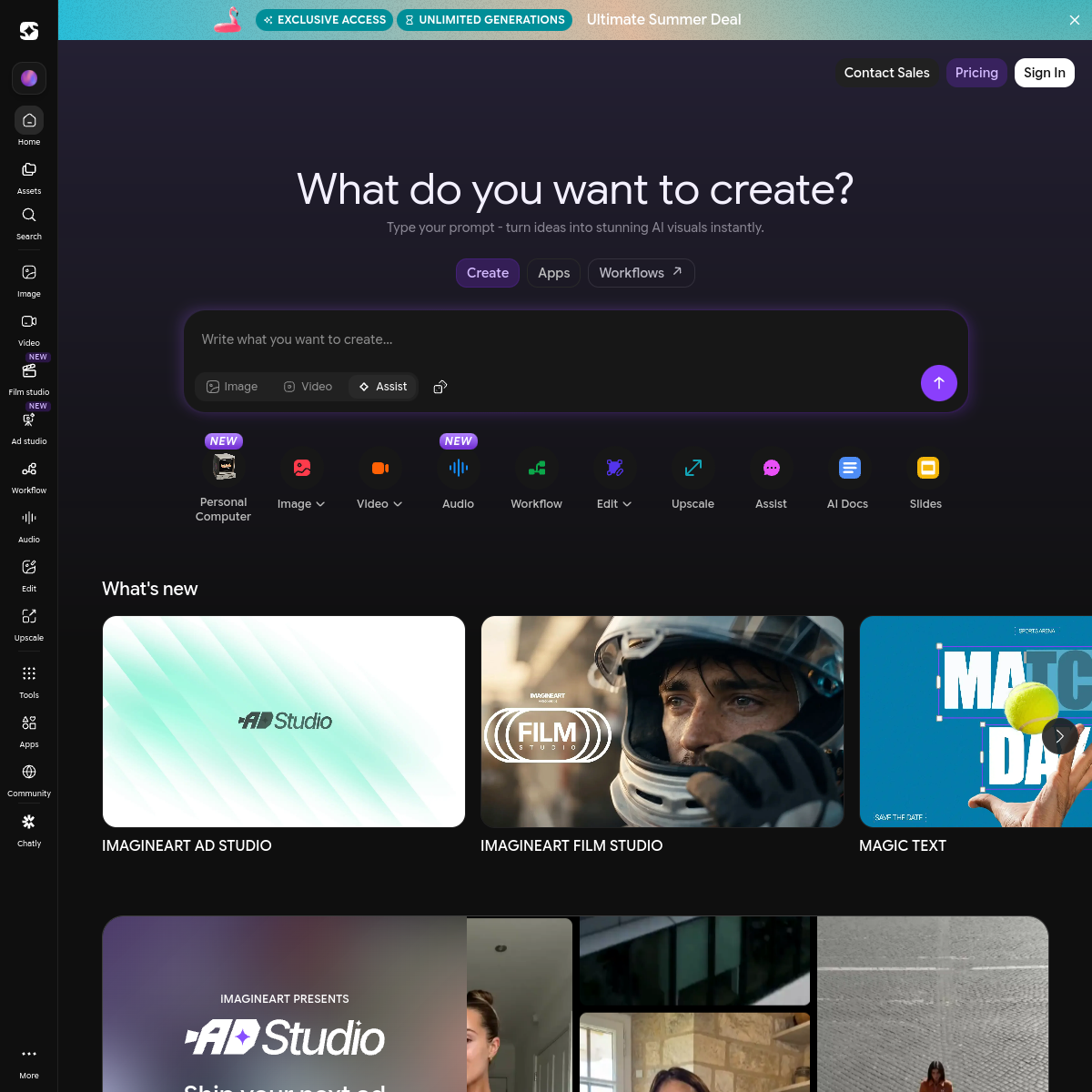
What ImagineArt actually looks like
Scroll inside the panel to see the full homepage. Live screenshot — updates as the product evolves.
Best for
- Designers and marketers who want one canvas instead of five subscriptions
- Mobile-first creators
- Teams that need both image and video without switching tools
Not for
- Researchers needing raw model parameter control
- Power users training custom checkpoints daily
What it actually does
Image generation
Multi-model text-to-image with realistic and stylized outputs, model selection per generation, and consistent character/scene tools.
Video generation
Text-to-video and image-to-video across multiple models. Switch the underlying video engine per generation depending on the brief.
Image editing
Inpainting, outpainting, background removal, restyling, and upscaling — all on the same canvas. No exporting between apps.
Mobile suite
Native iOS and Android apps with full feature parity to web. Real mobile-first product, not a wrapped web view.
Custom models
Fine-tune your own model on your brand assets or character sets. Available on Studio and above.
API & embed
Programmatic access for teams, plus a partner embed widget. The platform sits inside other products too.
What's new from ImagineArt
- Apr 2026
Film Studio
Cinematic video workspace with timeline editing, shot grouping, and multi-shot consistency tools.
- Feb 2026
Supercomputer
On-demand heavy compute for batch generation, fine-tuning, and large-format work.
- Dec 2025
Studio canvas
Figma-like infinite canvas for image generation, replacing the older single-prompt UI.
- Sep 2025
ImagineArt 2.0 model
Their first in-house flagship model, ranking competitively against Flux and Midjourney v6.
Powered by 28+ models
Platforms are only as good as the models they wrap. Here's the current catalog inside ImagineArt — the in-house flagship plus every third-party model you can switch to.
Composite of editorial review, hands-on testing, and reader-reported value. Each sub-score is rated 0–5 against Ground Truth's published criteria.
- Overall
- 4.6/5
- Output quality
- 4.6/5
- Utility & features
- 4.6/5
- Usability & UX
- 4.6/5
- Performance & reliability
- 4.6/5
- Cost vs. value
- 4.6/5
Pros
- +Genuinely one of the cleanest UIs in the category — feels closer to a creative app than a chatbot wrapper.
- +Bundles image, video, and editing without forcing tab-juggling.
- +Free tier is usable, not just a trial.
- +Mobile experience is real, not a half-baked port.
Cons
- −Power users will hit ceilings on the cheapest tier sooner than on credit-heavy competitors.
- −Video output quality varies by model — pick carefully.
- −Niche features (LoRA training, custom checkpoints) live behind higher tiers.
What it costs, by tier
Free tier includes daily credits; Pro from $9/mo with priority generation.
Daily credits, no card required.
- Daily image + video credits
- Access to ImagineArt 2.0
- Watermarked exports
- Mobile + web access
For solo creators shipping daily.
- Unlimited generation (fair use)
- All 28+ models unlocked
- No watermark on exports
- Priority queue
- 4K upscaling
Teams of 3+.
- Everything in Pro, for the team
- Shared workspace + assets
- Per-seat billing
- API access (10k calls/mo)
- Custom-model fine-tuning
API + SLA.
- Dedicated account team
- Custom usage limits
- SLA + uptime guarantee
- Private deployments
- Compliance and SSO
Common questions about ImagineArt
Is ImagineArt good for beginners?
Yes — it's one of the most beginner-friendly creative suites in the AI space. The interface assumes you don't want to think about checkpoints, samplers, or ControlNets. Pick a model, type a prompt, and you have an editable image in under a minute. Power users will eventually outgrow it; everyone else finds it the right level of abstraction.
Does ImagineArt have a free tier?
Yes. The free plan includes daily generations, access to several models, and basic editing. The paid tier ($16/mo) unlocks higher quality, faster queues, and a broader model selection. Reasonable free credits, generous compared to most competitors.
How does ImagineArt compare to Midjourney?
Midjourney is the better pure image model — sharper, more cohesive aesthetic, deeper community lore. ImagineArt's win is the suite: image, video, edits, and mobile apps in one workspace. Pick ImagineArt when you want one tool to cover your whole creative workflow; pick Midjourney when you want the best image output and nothing else.
Can I use ImagineArt outputs commercially?
Yes on the paid plans, with the standard caveats about training data and likeness rights. Read the current terms before using outputs in a paid campaign or product — AI image licensing is still evolving and ImagineArt's policy is in line with most peers (commercial use allowed on paid plans, with restrictions on certain protected content).
What models does ImagineArt run?
ImagineArt ships its own in-house image model alongside access to most current frontier models — Flux Pro, Stable Diffusion 3.5, and several specialized models for video and editing. The model picker is a first-class UI element, not buried in settings.
Is the mobile app any good?
Yes — and it's actually the differentiator. Most AI image tools treat mobile as an afterthought. ImagineArt's iOS and Android apps are full-feature, including video generation and editing. If you want to make creative work on your phone, this is one of the very few tools that's not painful.
Ready to try ImagineArt?
There's a real free tier — you can test the verdict yourself in five minutes.
Outbound link may be tracked. See affiliate disclosure.